
Getting started
A tour of the back office
Every item in the sidebar, what it is for, and where it is documented.
The sidebar is the map of your platform. This page lists every item in it, for casino and packs platforms, with a link to the page that explains it.
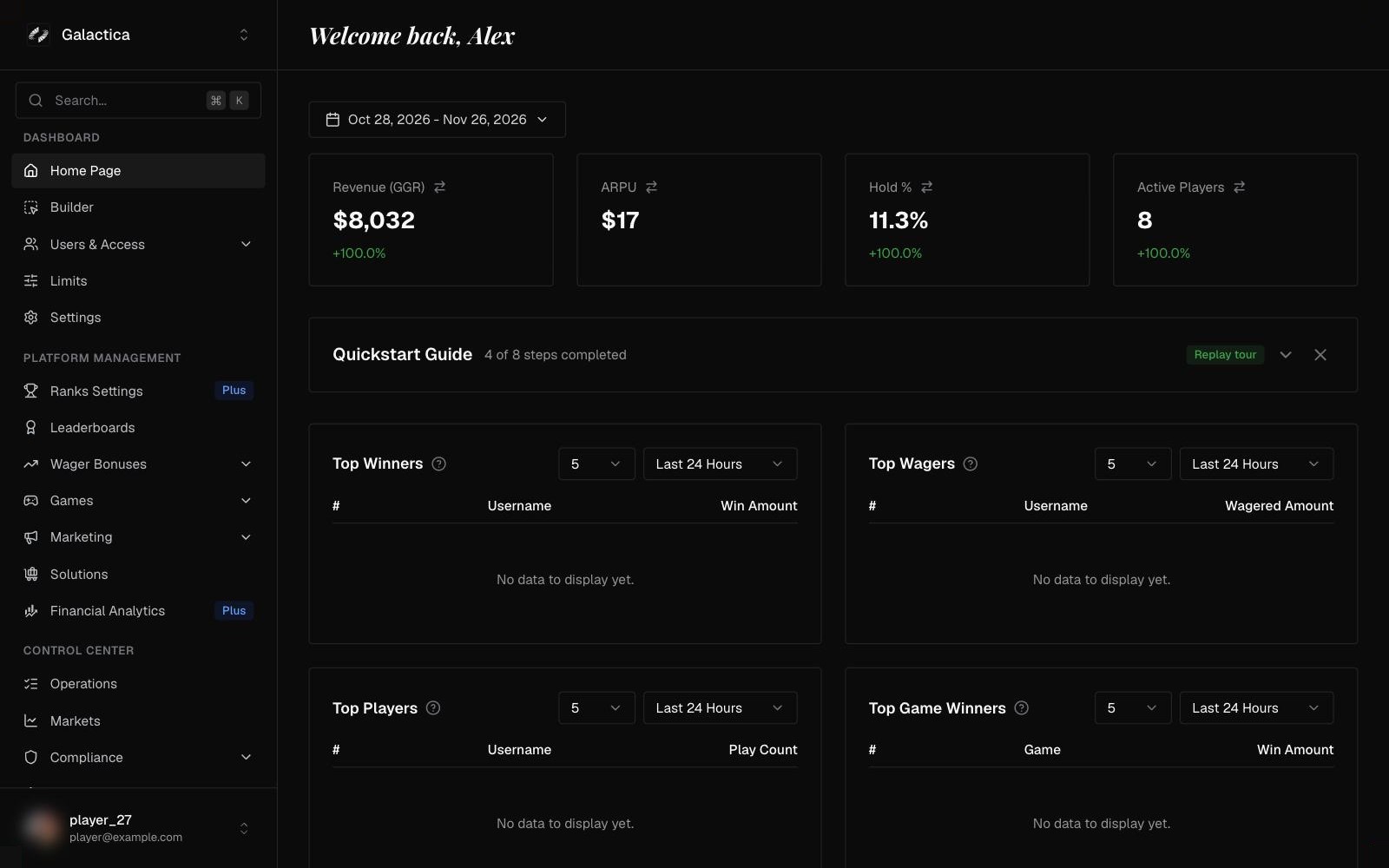
Dashboard
| Item | What it is for | Docs |
|---|---|---|
| Home Page | Headline numbers and top lists | The Home dashboard |
| Builder | Design your storefront | Builder overview |
| Inventory (packs) | Cards held on the platform | — |
| Users & Access → Users | Every player | Users, Player profile |
| Users & Access → Affiliates | Not available yet | — |
| Users & Access → Operators | Your team | Operators and roles |
| Users & Access → Permissions | Roles and what they allow | Operators and roles |
| Users & Access → KYC Reviews (casino) | The identity review queue | KYC |
| Limits (casino) | Default betting and withdrawal limits | Player limits |
| Settings | Platform, finance, legal and product settings | See Settings tabs below |
Platform Management
Casino
| Item | What it is for | Docs |
|---|---|---|
| Ranks Settings | The loyalty ladder | Ranks |
| Leaderboards | Not available yet | — |
| Wager Bonuses | Wagering requirements and their progress | Wager policies |
| Games → Game Settings | Every game and its status | Games and providers |
| Games → Promote Games | Coming soon | — |
| Games → Providers Settings | Switch studios on and off | Games and providers |
| Games → Game Releases | Upcoming titles | Games and providers |
| Marketing → Blog | Blog posts | Banners and blog |
| Marketing → Promocodes | Codes and their redemptions | Promocodes |
| Marketing → Banner Settings | Homepage banners | Banners and blog |
| Marketing → Bonus Rules, Gift Cards | Not available yet | — |
| Solutions | Not available yet | — |
| Financial Analytics | Revenue and provider fees | Financial Analytics |
Packs
| Item | What it is for | Docs |
|---|---|---|
| Products → Packs | Multi-card packs | Packs and Singles, Create a pack |
| Products → Singles | One-card pulls | Packs and Singles |
| Products → Marketplace | Player-to-player listings and your fee | Marketplace |
| Marketing | Blog, promocodes and banners, as on casino | See above |
| Pricing | The card price catalog | Pricing catalog |
| Ranks Settings | The loyalty ladder | Ranks |
| Rarities | Value bands for rarity labels | Rarities |
| Leaderboard | Opens Settings → Rankings | Ranks |
Control Center
The Control Center is where you watch money move and manage risk.
| Item | What it is for | Docs |
|---|---|---|
| Operations | Every deposit, withdrawal, adjustment and bonus | Operations |
| Markets (casino) | Prediction markets | Markets |
| Fulfillment (packs) | Opens Settings → Shipping | Pack settings |
| Compliance → KYC Settings | Identity verification levels | KYC |
| Compliance → Countries Settings | Where you operate | Countries |
| Compliance → Legal Pages | Links to your policies | Platform details |
| Fraud Detection → Dashboard | Alert summary and risky players | Fraud Detection |
| Fraud Detection → Alerts | The alert queue | Fraud Detection |
| Fraud Detection → Rules | What raises an alert | Fraud Detection |
| SEO Settings | Metadata, icons, tracking scripts and support chat | SEO settings |
| Merchant Wallets | Not available yet | — |
A daily Control Center routine
- Operations → Withdraw. Clear pending withdrawals.
- KYC Reviews. Approve or decline pending submissions, oldest first.
- Fraud Detection → Dashboard. Check pending and critical alerts.
- Home. Compare today's revenue and active players with the previous period.
Settings tabs
| Tab | Casino | Packs | Docs |
|---|---|---|---|
| Platform | Yes | Yes | Platform details |
| Finance | Yes | Yes | Finance settings |
| Legal | Yes | Yes | Legal entity |
| Documents | Yes | Yes | Documents |
| Affiliates | Yes | Yes | Affiliates |
| Security | Yes | Yes | KYC |
| Rankings | Yes | Yes | Ranks |
| Casino | Yes | — | Casino settings |
| Gift Card | Yes | — | Gift cards |
| System | Yes | — | Maintenance mode |
| Notifications | Yes | — | Notifications |
| Packs | — | Yes | Pack settings |
| Fairness | — | Yes | Pack settings |
| Catalog | — | Yes | Pricing catalog |
| Vault | — | Yes | Pack settings |
| Shipping | — | Yes | Pack settings |
Plan badges
A Plus badge beside a sidebar item, a provider or a Builder feature means it needs the Plus plan or above. Your current plan shows under Settings → Platform → Current Plan.