
Packs
Marketplace
Let players sell cards to each other, set your fee, and control what can be listed.
The marketplace lets players list the cards they have pulled and sell them to other players on your platform. You earn a fee on every sale. Find it under Platform Management → Products → Marketplace.
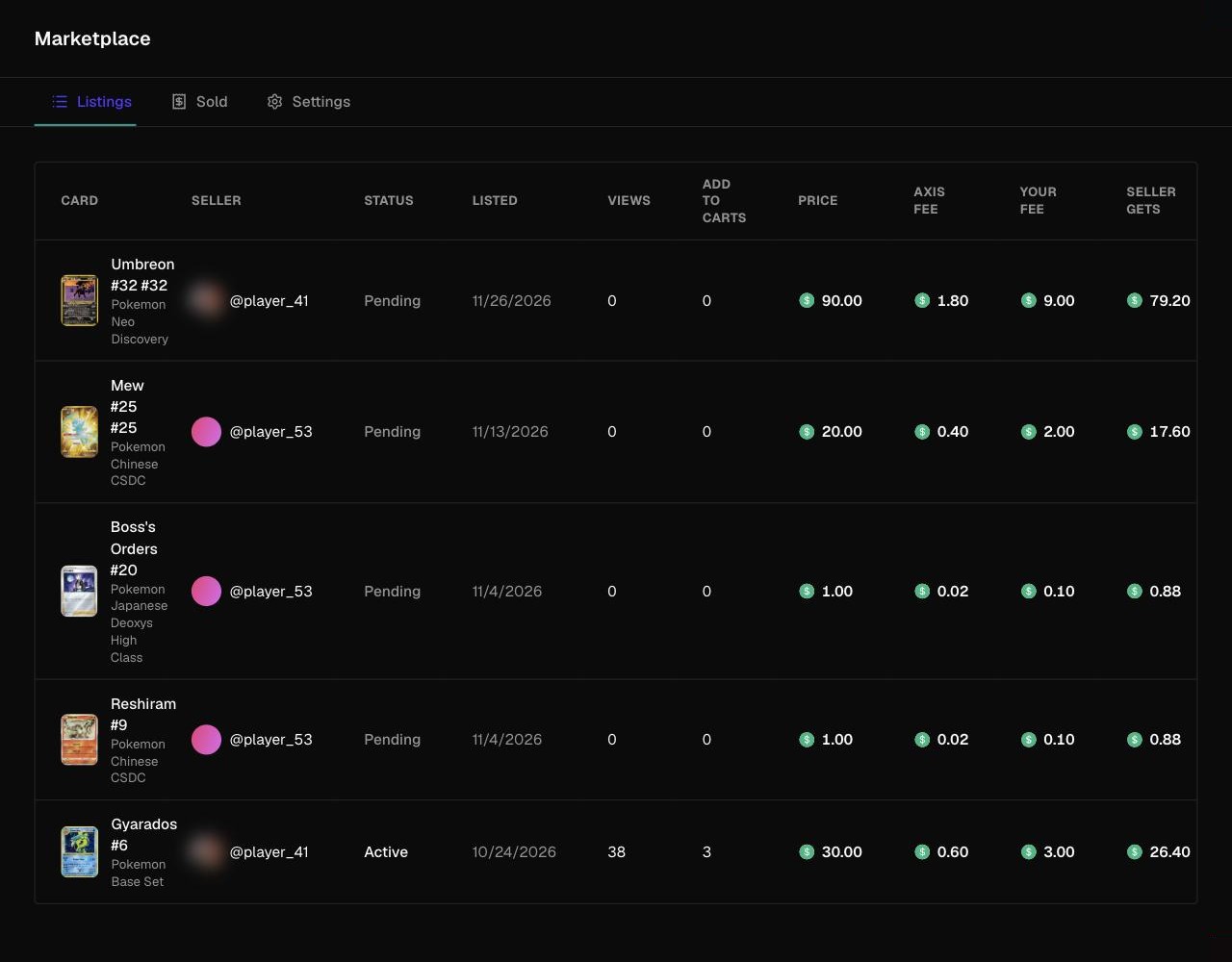
The page has three tabs: Listings, Sold and Settings.
How the money splits
Every sale is divided three ways, all taken out of the sale price.
| Share | Who gets it | Set by |
|---|---|---|
| Marketplace fee | You | You, as a percentage |
| Platform fee | Axis | Fixed at 2%. It cannot be changed |
| Seller gets | The player who listed the card | Whatever is left |
The buyer pays the listed price. Nothing is added on top.
Worked example
With your marketplace fee at 10%, a $100.00 listing settles like this.
| Line | Amount |
|---|---|
| Buyer pays | $100.00 |
| You earn | $10.00 |
| Axis fee | $2.00 |
| Seller gets | $88.00 |
The Settings tab shows this preview live as you change your fee.
Settings
Fees
| Setting | What it does |
|---|---|
| Marketplace fee | Your cut, taken out of the sale price on every sale |
| Platform fee | Axis's cut, taken out of the sale price. Fixed at 2% |
| Preview | What a $100.00 listing settles to with the current fees |
Listing rules
| Setting | What it does |
|---|---|
| Marketplace enabled | When off, the storefront marketplace is closed and players cannot list cards |
| Require review before live | New listings wait for your approval before they appear |
| Minimum listing price | The lowest price a player can list a card for |
| Maximum listing price | The highest price a player can list a card for |
| Max active listings per user | How many cards one player can have listed at once |
Choosing your rules
- Turn on Require review before live while the marketplace is new. You see what players list and at what prices before anything goes public.
- Set a Minimum listing price above your payment costs, so a sale is never worth less than it costs to process.
- A Max active listings per user limit stops one account from flooding the marketplace.
Listings
Every card currently for sale.
| Column | What it shows |
|---|---|
| Card | The card listed |
| Seller | The player selling it |
| Status | The listing's state, for example live or waiting for review |
| Listed | When it was listed |
| Views | How many times the listing has been viewed |
| Add to carts | How many times it has been added to a cart |
| Price | The asking price |
| Axis fee | Axis's share if it sells |
| Your fee | Your share if it sells |
| Seller gets | The seller's share if it sells |
| Actions | Remove takes the listing down |
A listing with many views and cart adds but no sale is usually priced a little too high.
Sold
Every completed sale. The columns match Listings, with Buyer and Sold (the sale date) in place of status and listed date.
Use this tab to total your marketplace earnings: the Your fee column is your revenue per sale.
On the player's profile
Each player's own listings and trades appear on the Marketplace tab of their profile.