
Builder
Popups
Every popup a player meets (sign up, log in, username, login required, VPN block, promo code, bet details, rewards) and what you can change on each.
Popups are the dialogs players meet as they use your site. Design them under Nav → Popups in the Control Panel.
Opening a popup shows a live preview of it on the canvas. Click any part of the preview to jump to its setting, or work down the panel.
| Popup | When players see it | Casino | Packs |
|---|---|---|---|
| Sign Up | Creating an account | Yes | Yes |
| Log In | Signing in | Yes | Yes |
| Username | Choosing a username after signing up | Yes | Yes |
| Login Required | Trying something that needs an account | Yes | Yes |
| VPN Block | Connecting from a blocked location | Yes | Yes |
| Promo Code | Redeeming a code | Yes | Yes |
| Bet Details | Opening the details of a bet | Yes | No |
| Rewards | Opening their rewards | Yes | Yes |
Editing popups needs the Plus plan. Without it the panel shows "Plus plan required" above the settings.
Reset all sign-in settings at the bottom of every popup restores the defaults for all of them, not only the one you have open.
Sign Up and Log In
These two share one layout: a banner image on one side, the form on the other.
Banner
| Setting | What it does |
|---|---|
| Brand image | The image beside the form. Click or drop an image; Remove clears it |
| Logo overlay | Shows a logo at the top of the banner image. Has its own image and on/off switch |
Terms attestation text
The "I agree" line under the form.
| Setting | What it does |
|---|---|
| Text | The sentence itself, for example the age and terms statement |
| Link label | The words that are linked, for example "Terms and Conditions" |
| Link URL | Where the link goes |
Point Link URL at your own terms. The default is a placeholder address.
Modal Text
| Setting | Default |
|---|---|
| Heading | "Welcome" |
| Subheading | "Sign up or log in to start playing." |
Header Buttons
The Log In and Sign Up buttons in your site header.
| Setting | What it does |
|---|---|
| Log In label, Sign Up label | The words on each button |
| Sign Up button color, Log In button color | Their colours |
| Sign Up hover color, Log In hover color | Their colours under the pointer |
| Button font | The font for both |
| Reset to default | Restores the default buttons |
You can also reach these from the canvas: click the sign-in buttons in the header.
Registration
| Setting | What it does |
|---|---|
| Privacy Policy URL | The address of your privacy policy |
| Referral code field | Shows the optional referral code input on sign up |
Username
Shown when a new player needs to choose a username.
| Setting | Default |
|---|---|
| Background color | — |
| Title, Title color | "We just need a few more details…" |
| Subtitle, Subtitle color | A line asking the player to choose a username |
| Button text, Button color, Button text color | "Done" |
| Font | System Default |
Login Required
Shown when a signed-out visitor tries something that needs an account.
| Setting | Default |
|---|---|
| Background color | — |
| Icon | The picture at the top |
| Title, Title color | "Please log in" |
| Message, Message color | A line explaining that an account is needed |
| Button text, Button color, Button text color | "Log In" |
| Font | System Default |
VPN Block
Shown to a visitor connecting from a location you do not serve. See Countries for where that is decided.
| Setting | Default |
|---|---|
| Background color | — |
| Icon | The picture at the top |
| Title, Title color | "Access unavailable" |
| Message, Message color | A line saying the site is not available in the visitor's location |
| Font | System Default |
This popup has no button. There is nothing for the visitor to do next.
Promo Code
Where a player enters a promocode.
| Setting | Default |
|---|---|
| Background color | — |
| Icon | The picture at the top |
| Title, Title color | "Promotional code" |
| Message, Message color | A line telling players where to find codes |
| Button text, Button color, Button text color | "Claim" |
| Font | System Default |
| Field label | "Enter the Promotional Code" |
| Placeholder | "Code" |
Rewrite the default Message for your own brand. It names a product, and may not match what your platform offers.
Bet Details
Casino only. Shown when a player opens one of their bets.
| Setting | What it does |
|---|---|
| Logo | The logo at the top. Defaults to your header logo |
| Background color, Panel color | The popup and its inner panel |
| Title color, Label color | Text colours |
| Play button text | The button label. {game} is replaced with the game's name, as in "Play {game}" |
| Button color, Button text color | The play button |
| Font | System Default |
| Show logo | Shows or hides the logo |
| Show play button | Shows or hides the button that opens the game |
| Show provably fair | Shows or hides the provably fair section |
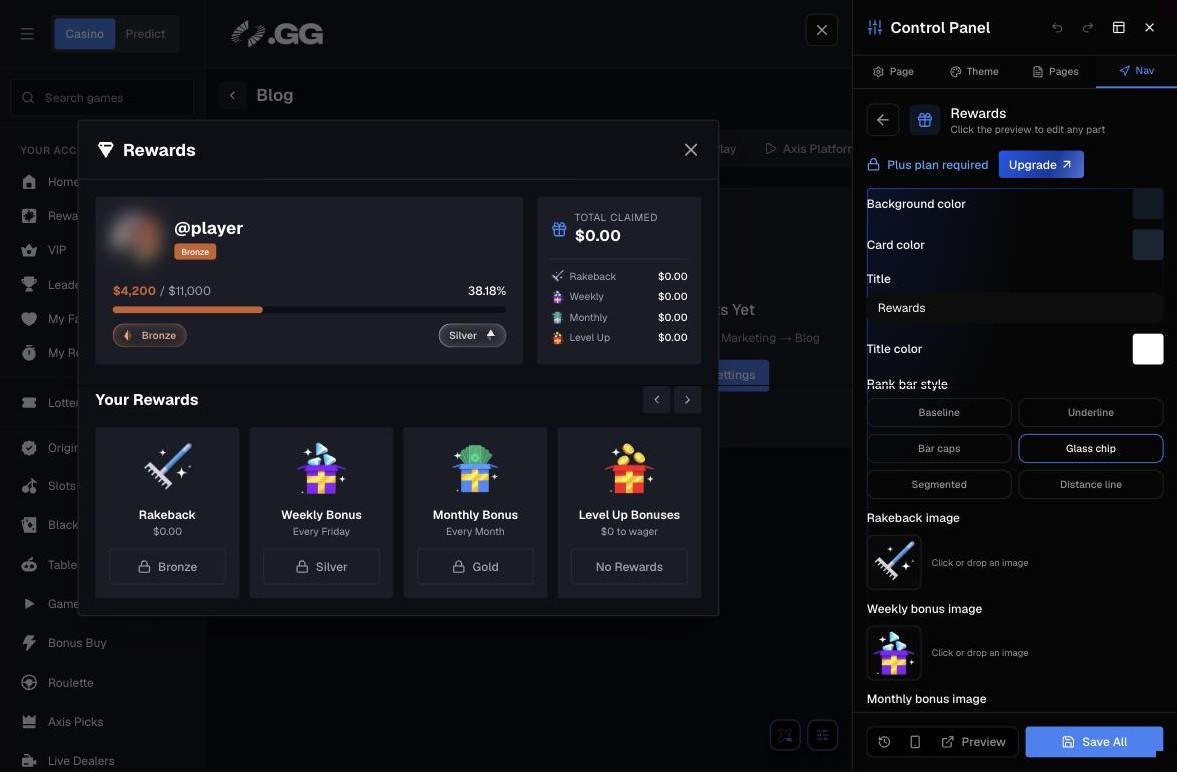
Rewards
The popup behind the Rewards button in the header.
| Setting | What it does |
|---|---|
| Background color, Card color | The popup and the cards inside it |
| Title, Title color | The heading, by default "Rewards" |
| Rank bar style | How rank progress is drawn |
| Rakeback image | The picture on the Rakeback card |
| Weekly bonus image | The picture on the Weekly Bonus card |
| Monthly bonus image | The picture on the Monthly Bonus card |
| Level up bonus image | The picture on the Level Up Bonuses card |
Rank bar styles
| Style |
|---|
| Baseline |
| Underline |
| Bar caps |
| Glass chip |
| Segmented |
| Distance line |
The ranks themselves, and what each reward pays, are set under Ranks.
Before you publish
- Open each popup in the Builder and read every line. Default copy is written to be replaced.
- Check both links on the sign-up popup: terms and privacy policy.
- Open Preview on phone / tablet and check the sign-up form reads well at phone size.