
Builder
The Predictions page
Design the prediction-markets lobby: data sources, the market grid, category tabs and the event page.
The Predictions page is your prediction-markets lobby. Players reach it from the Predict side of the header toggle. Open it in the Builder from Pages → Quick Access → Predictions, then switch to the Page tab.
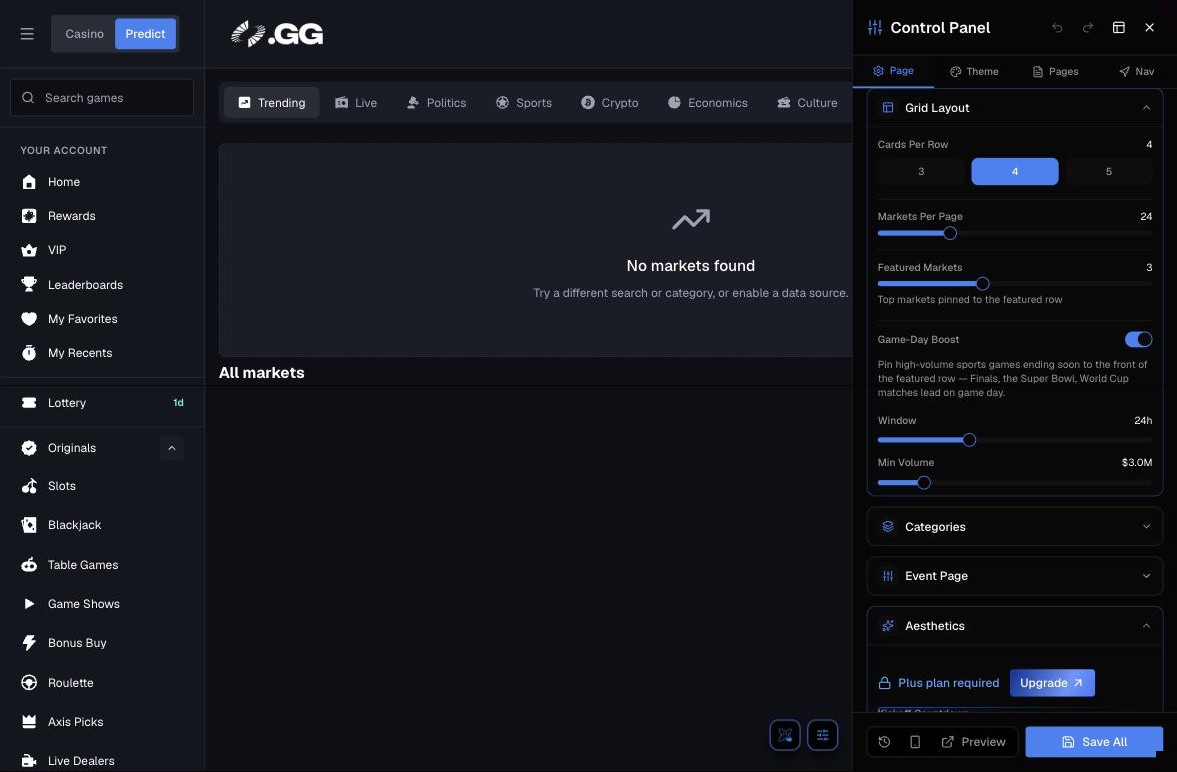
It has the same page settings as any other page (the Page and Footer switches, Sidebar, Game Row and Provider Row), plus five sections of its own.
| Section | What it controls |
|---|---|
| Data Sources | Which venues supply markets, and how often prices refresh |
| Grid Layout | How many market cards show, and which ones are featured |
| Categories | The category tabs across the top of the lobby |
| Event Page | What a player sees after opening a market |
| Aesthetics | Countdown style and the fonts used for scores and percentages |
Data Sources
| Setting | What it does |
|---|---|
| Polymarket | Shows markets sourced from Polymarket |
| Kalshi | Shows markets sourced from Kalshi |
| Refresh Interval | How often live prices and trades are fetched from the venues, from 5 to 60 seconds |
When the lobby has nothing to show it reads "No markets found" and suggests trying another search or category. If you see that on every category, check that a data source is on.
A shorter refresh interval keeps prices closer to the venue but makes more requests.
Grid Layout
| Setting | What it does |
|---|---|
| Cards Per Row | Market cards per row on desktop: 3, 4 or 5 |
| Markets Per Page | How many markets load per page, from 12 to 60 |
| Featured Markets | How many top markets are pinned to the featured row, from 0 to 8 |
Game-Day Boost
Game-Day Boost pins high-volume sports games that are about to end to the front of the featured row, so the big matches lead on the day they are played.
| Setting | What it does |
|---|---|
| Game-Day Boost | Turns the boost on or off |
| Window | How close to its end a game must be to qualify, from 1 to 72 hours |
| Min Volume | The trading volume a game needs to qualify, in millions of dollars |
Set Featured Markets to 0 if you do not want a featured row at all.
Categories
The category tabs across the top of the lobby.
| Setting | What it does |
|---|---|
| Show Search Bar | Shows a market search box above the tabs |
| Show Category Icons | Shows an icon on each category tab |
| Show Market Card Icons | Shows an icon on each market card |
| Category list | Turn each tab on or off, rename it, change its icon, and drag its handle to reorder |
| Add Category | Adds a category tab |
The list is split into Active and Inactive. The built-in categories are:
| Category |
|---|
| Trending |
| Live |
| Politics |
| Sports |
| Crypto |
| Economics |
| Culture |
| Commodities |
| Climate |
| Finance |
| Technology |
Turn off categories you have no markets for. An empty tab reads as a broken page.
Event Page
The page a player lands on after opening a market.
| Setting | What it does |
|---|---|
| Live Trade Ticker | Shows a running feed of trades as they happen |
| Order Book Prices | Shows prices from the order book |
| Default Chart Range | The range the price chart opens on: LIVE, 1D, 1W, 1M or ALL |
| Pre-Market Line Style | How an outcome's line is drawn for the time before it entered the market: Opaque or Dotted |
| Show Pre-Market Tooltip | Shows every outcome's percentage in the chart tooltip, even for the time before it entered the market |
Aesthetics
Aesthetics needs the Plus plan.
| Setting | Choices | What it changes |
|---|---|---|
| Kickoff Countdown | Timer or Starts in | How the time until a game starts is shown. Timer is a ticking HH:MM:SS clock |
| Score Font | Scoreboard, DSEG7, Mono or Sans | The font for live game scores on cards |
| Percentage Font | Scoreboard, DSEG7, Mono or Sans | The font for outcome percentages |
Related
- Markets for the markets themselves.
- Navigation → Header → Toggle for the Casino / Predict switch.
- Navigation → Mobile for the blocks on the phone version of this page.