
Builder
Category, blog and account pages
What you can design on game category pages, the Blog page, Favorites and Recents, and which pages have no settings of their own.
Every page on your storefront opens in the Builder, but they do not all have the same settings. This page covers the ones not described elsewhere.
| Page | Its own settings |
|---|---|
| Home | Banner, Search, Tiles, Game Row, Provider Row. See Page sections |
| Predictions | Data Sources, Grid Layout, Categories, Event Page, Aesthetics. See The Predictions page |
| Lottery | Seven sections. See The Lottery page |
| Game category pages | Title, Contents, Mini Footer |
| Blog | Blog Layout, Blog Categories, Blog Colors |
| My Favorites, My Recents | Page Configuration, edited on the canvas |
| Rewards, VIP, Leaderboards, Affiliates, Support, Settings | None beyond the standard ones |
Every page has the standard controls at the top of the Page tab: the page icon, the page URL, the Page and Footer switches, and a Sidebar section.
Game category pages
Originals, Slots, Blackjack, Table Games, Game Shows, Bonus Buy, Roulette, Axis Picks and any category page you create share one layout: a title and a grid of games. Editing them needs the Plus plan.
Title
| Setting | What it does |
|---|---|
| Show Icon | Shows the page icon beside the title |
| Icon | Which icon |
| Color | Colour of the title |
| Font | Font of the title |
| Size | From 14 to 40 pixels. The default is 20 |
Contents
| Setting | What it does |
|---|---|
| Corner radius | Rounding of the game cards, from 0 to 24 pixels |
| Games per row | How many columns the game grid has |
| Reset to defaults | Restores the default grid |
More games per row means smaller cards. Check the result on a wide screen and on a phone.
Mini Footer
The strip of controls under a game while it is being played.
| Setting | What it does |
|---|---|
| Icons | Which controls show: Fullscreen, Settings, Favorite, Statistics and Open external |
| Middle Image | The image in the centre of the strip. It uses your header logo until you replace it |
Blog
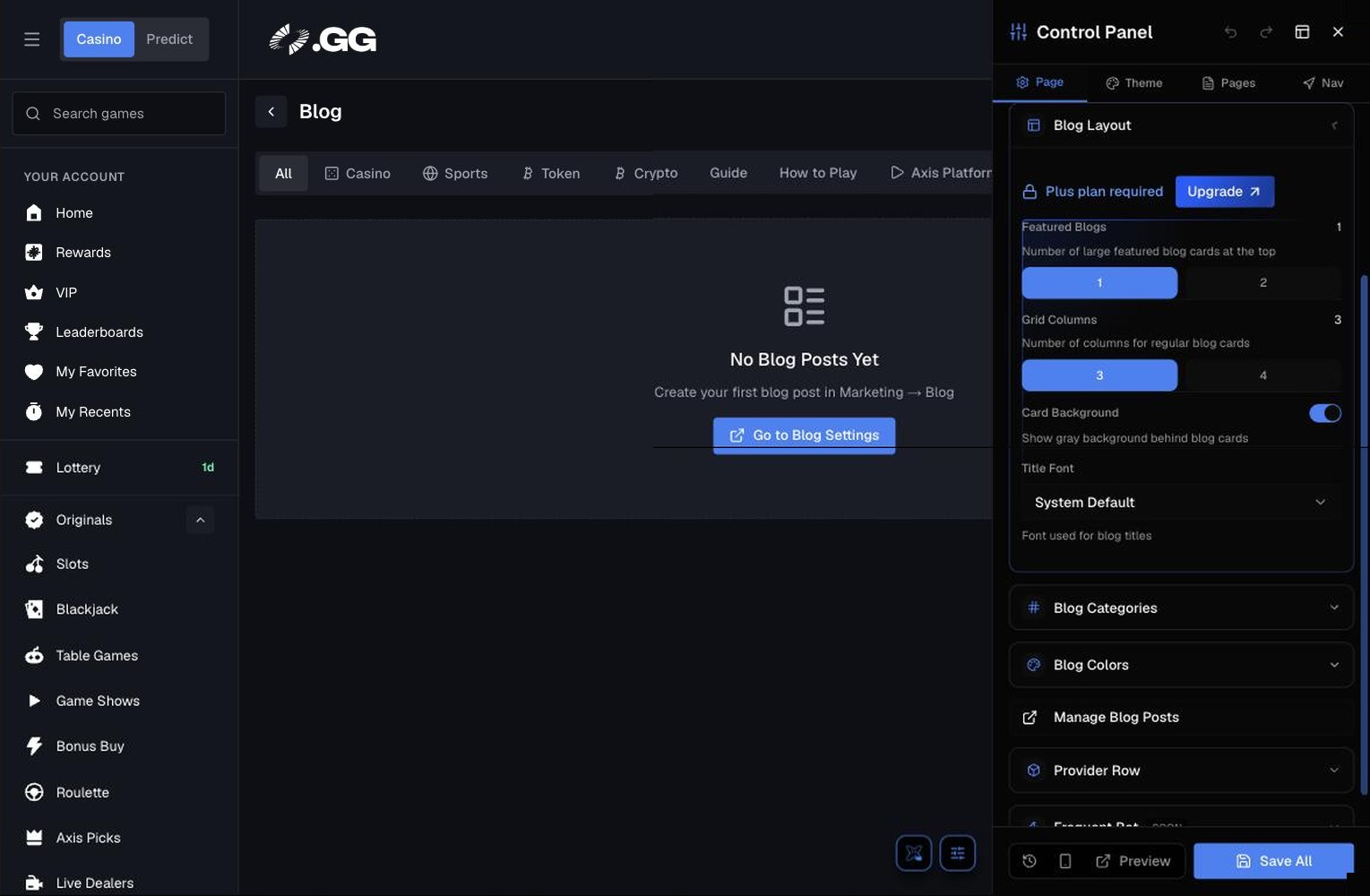
The Blog page lists your posts. The posts themselves are written under Marketing → Blog; the panel's Manage Blog Posts link takes you there. See Banners and blog. Editing the Blog page's design needs the Plus plan.
Blog Layout
| Setting | What it does |
|---|---|
| Featured Blogs | How many large featured cards sit at the top: 1 or 2 |
| Grid Columns | How many columns the regular cards use: 3 or 4 |
| Card Background | Shows a grey background behind blog cards |
| Title Font | The font for blog titles |
Blog Categories
The tabs across the top of the Blog page. Drag to reorder, click an icon to change it, and type a name to add a category. All is always first.
Blog Colors
| Colour | Where it is used |
|---|---|
| Link Color | Hyperlinks in blog content |
| Text Color | Body text and paragraphs |
| Title Color | Headers and headings |
| Bullet Color | List markers and bullets |
Reset to default restores the default colours.
My Favorites and My Recents
These pages are edited on the canvas. A Page Configuration block sits on the page itself.
| Setting | What it does |
|---|---|
| Page Visibility | Whether players can see the page |
| Empty State Message | The message shown when the player has nothing saved yet |
| Call-to-Action Button | The button shown under that message |
The Settings page
The player's own settings page, at /settings. Its tabs are fixed.
| Tab |
|---|
| Account |
| Transactions |
| My Bets |
| Verify |
| Security |
| Preferences |
| Sessions |
| Ignored Users |
Pages with no settings of their own
Rewards, VIP, Leaderboards, Affiliates and Support show only the standard controls. Their look follows your Theme, and the Rewards popup has its own editor under Popups.
Most of these pages look empty in the Builder because the canvas shows what a signed-out visitor sees. Use Preview as logged in to see the signed-in version.