
Builder
The Lottery page
Design the lottery page: the hero, entry types, the number picker, draw details, how-to-play steps and the FAQ.
The Lottery page is where players buy lottery entries and check draws. Open it in the Builder from Pages → Account → Lottery, at /lottery, then switch to the Page tab.
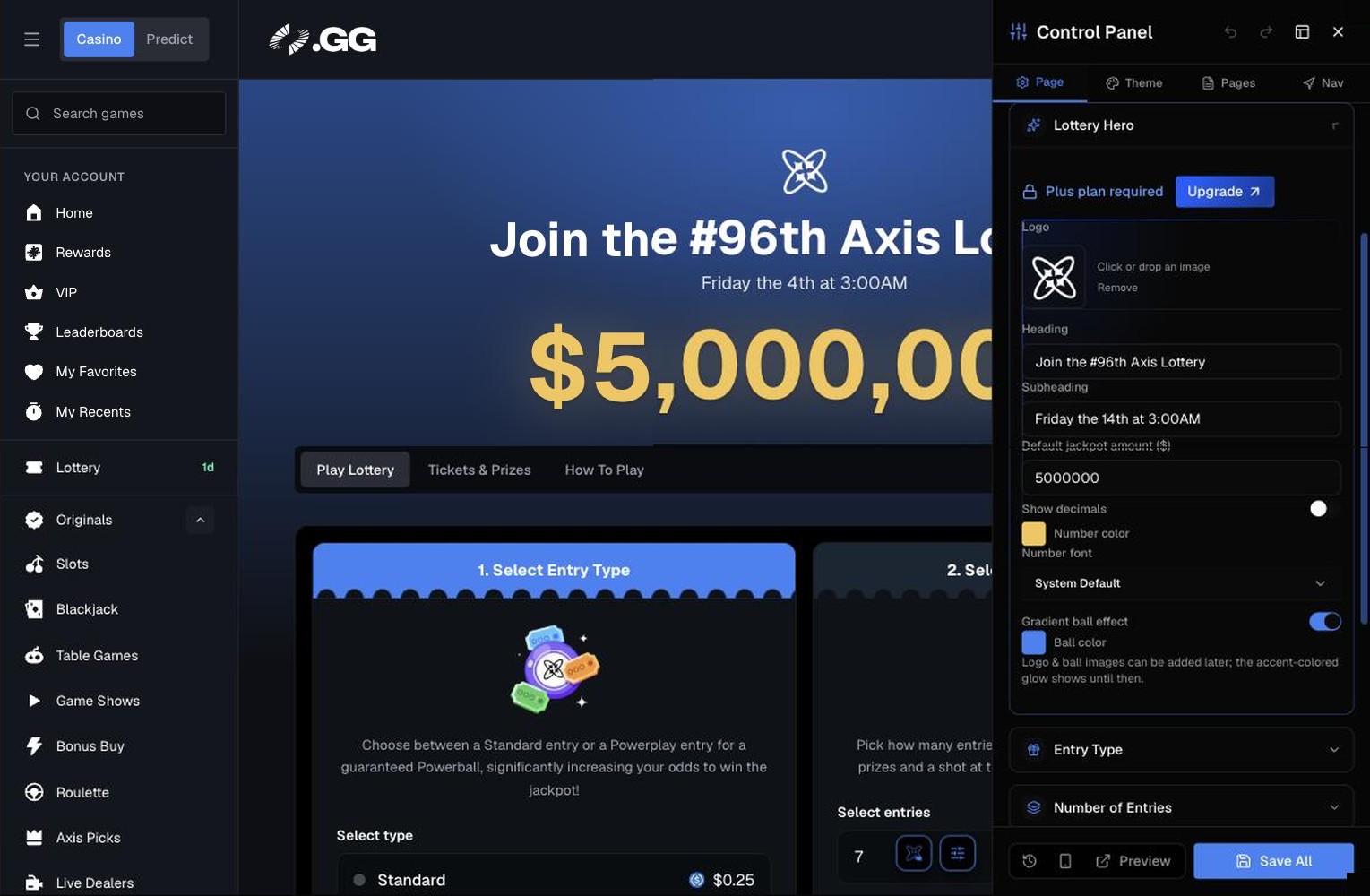
Editing the Lottery page needs the Plus plan. Without it each section shows "Plus plan required" above its settings.
The page is built from seven sections, in the order players see them.
| Section | What it controls |
|---|---|
| Lottery Hero | The banner at the top: heading, date line and jackpot figure |
| Entry Type | Step 1: the Standard and Powerplay entries and their prices |
| Number of Entries | Step 2: how many entries the player buys |
| Choose Lottery Numbers | Step 3: the number picker |
| Draw & Prizes | The Tickets & Prizes view: draw number, date, results and empty states |
| How To Play | The How To Play tab: playing steps and checking-results steps |
| Entry Types & FAQ | The entry-type explainer and the questions under it |
The page also has the standard Sidebar, Game Row and Provider Row sections described in Page sections.
Lottery Hero
| Setting | What it does |
|---|---|
| Logo | An image shown in the hero. Click or drop an image; Remove clears it |
| Heading | The main line, for example "Join the #96th Axis Lottery" |
| Subheading | The line under it, normally the draw date and time |
| Default jackpot amount ($) | The jackpot figure shown in the hero |
| Show decimals | Shows the jackpot with cents |
| Number color | Colour of the jackpot figure |
| Number font | Font of the jackpot figure |
| Gradient ball effect | Draws the lottery balls with a gradient instead of a flat colour |
| Ball color | Colour of the balls |
Until you add a logo and ball images, the hero shows a glow in your accent colour.
Entry Type
Step 1 on the page. Players choose between two kinds of entry.
| Setting | What it does |
|---|---|
| Header text | The step title, by default "Select Entry Type" |
| Header color | Colour of the step title |
| Icon | An image beside the title |
| Standard label | The name of the basic entry |
| Standard price | Its price per entry |
| Powerplay label | The name of the higher-priced entry |
| Powerplay price | Its price per entry |
The default copy describes Powerplay as an entry with a guaranteed Powerball. If you rename the entries, update the copy in How To Play and Entry Types & FAQ so the names match.
Number of Entries
Step 2. Players pick how many entries to buy, with ½, 2x and Max shortcuts and a running total.
| Setting | What it does |
|---|---|
| Header text | The step title, by default "Select Number Of Entries" |
| Header color | Colour of the step title |
| Icon | An image beside the title |
Choose Lottery Numbers
Step 3. Each entry is a ticket with main numbers and one Powerball (PB).
| Setting | What it does |
|---|---|
| Header text | The step title, by default "Choose Lottery Numbers" |
| Header color | Colour of the step title |
| Powerball | Colour of the Powerball slot |
| Icon color | Colour of the picker's icons |
| Hover color | Colour of a number under the pointer |
| Auto-fill icon | The icon on Auto-fill All |
| Clear icon | The icon on Clear All |
| Main # | How many main numbers a ticket has. The default is 5 |
| Max # | The highest main number. The default is 69 |
| Max PB | The highest Powerball number. The default is 26 |
Main #, Max # and Max PB define the game itself, so they also decide the odds. The defaults (5 numbers from 69, Powerball from 26) match the classic Powerball format.
Draw & Prizes
The Tickets & Prizes view.
| Setting | What it does |
|---|---|
| Draw number | The number of the current draw |
| Draw date | The date and time line for the draw |
| Show date on hero | Also shows the draw date in the hero |
| First-draw title | The title used for your first draw, by default "The First Axis Draw" |
| Ticket header, Header bar | Colours for the ticket list |
| Result balls, Powerball | Colours of the drawn numbers |
| Winners icon | The icon beside the winners list |
| Empty-tickets icon | The image shown when the player has no tickets |
| Empty-tickets heading | The heading in that case, by default "No tickets for this draw yet" |
| Empty-tickets description | The line under it |
| Provably-fair server seed note | The text shown in place of the seed before the draw |
Prize amounts are split from the jackpot, so every prize division adds up to it. Odds use the classic Powerball table by default.
How To Play
Two sets of four cards.
| Set | What it explains | Fields |
|---|---|---|
| Playing steps | How to enter | Step 1 to Step 4, each with a title and a description |
| Checking-results steps | What happens at the draw | Card 1 to Card 4, each with a title and a description |
The defaults walk through choosing an entry type, picking numbers, buying tickets and waiting for the draw, then the draw going live, numbers being revealed, tickets being matched and prizes being paid.
Entry Types & FAQ
It holds the questions and answers shown at the bottom of the page. Four are filled in by default:
| Default question |
|---|
| How is the lottery provably fair? |
| When are draws held? |
| What is Powerplay? |
| How do I claim a prize? |
Rewrite the answers to match how your lottery runs. Players treat this text as your terms.
In the sidebar
The lottery's sidebar entry, with its countdown, is set under Nav → Sidebar: Show lottery, its position, and its text and countdown colours.