
Builder
Pack pages and the opening animation
Design what players see on a pack's page and while a pack opens: the reveal grid, pack energy, card charge, last-card effects and the ribbon.
On a packs platform, every pack and Single has its own page in the Builder. That page is where you design the opening itself: the light that bursts from the wrapper, how the cards arrive, how a big hit is celebrated.
Open one from Pages → Packs or Pages → Singles. Each pack lives at /pack/{name}. Then switch to the Page tab.
The page has three groups of settings. Click a group to open it; use the back arrow to return.
| Group | What it covers |
|---|---|
| Set Contents | The reveal grid, revealed cards, the window logo and the money counter |
| Pack & Opening | Pack energy and the face-down card stack |
| Card Reveals | Card charge, last-card effects and the ribbon |
The pack's contents, odds, price and wrapper are not set here. Hover the pack on the canvas and click Edit pack in Pack Studio, or see Create a pack.
The order of an opening
It helps to know when each setting plays.
- The player tears the wrapper. Pack Energy bursts from the tear line.
- The cards come out face down, either as a stack or one at a time (Card Stack).
- Face-down cards of chosen rarities glow before they flip (Card Charge).
- Each flipped card lands in its slot in the Reveal Grid, and the Money counter adds its value.
- The last card waits face down with its own effect (Last Card).
- If the last card is a hit, a Ribbon sweeps across the stage.
Set Contents
Reveal Grid
The grid of card slots on the pack page. Slots are face down until a card is revealed into them.
| Setting | What it does |
|---|---|
| Slot icon | The icon shown on unrevealed card slots. It applies to every pack page |
| Header text size | Size of the grid's header text, from 12 to 28 pixels |
| Card text size | Size of the text on each card, from 11 to 22 pixels |
| Back color | Fill of unrevealed card slots |
| Border color | Colour of the window frame, grid lines and label |
| Background color | Fill behind the card grid |
| Label | The word shown on a face-down slot. The default is "Unrevealed" |
| Slot shadow | Adds a drop shadow under unrevealed slots |
Revealed Cards
| Setting | What it does |
|---|---|
| Glow ranks | Revealed cards of the selected ranks glow in their rank colour inside their grid box |
| Darken on hover | Dims a card while the pointer is on it |
| Title color on hover | Recolours the card title while the pointer is on the card |
The ranks you can select are Common, Uncommon, Rare, Exotic, Legendary and Mythical. Their value bands and colours are set under Rarities.
Window Logo
| Setting | What it does |
|---|---|
| Logo | An image centred in the card window's header while a pack opens. Click or drop an image |
| Logo size | From 40% to 200% |
Money
The running total of what the pack has returned so far.
| Money effect | What players see |
|---|---|
| Pop | The amount bounces and glows when it changes |
| Roll | The digits roll to the new amount |
| None | The amount changes with no animation |
Pack & Opening
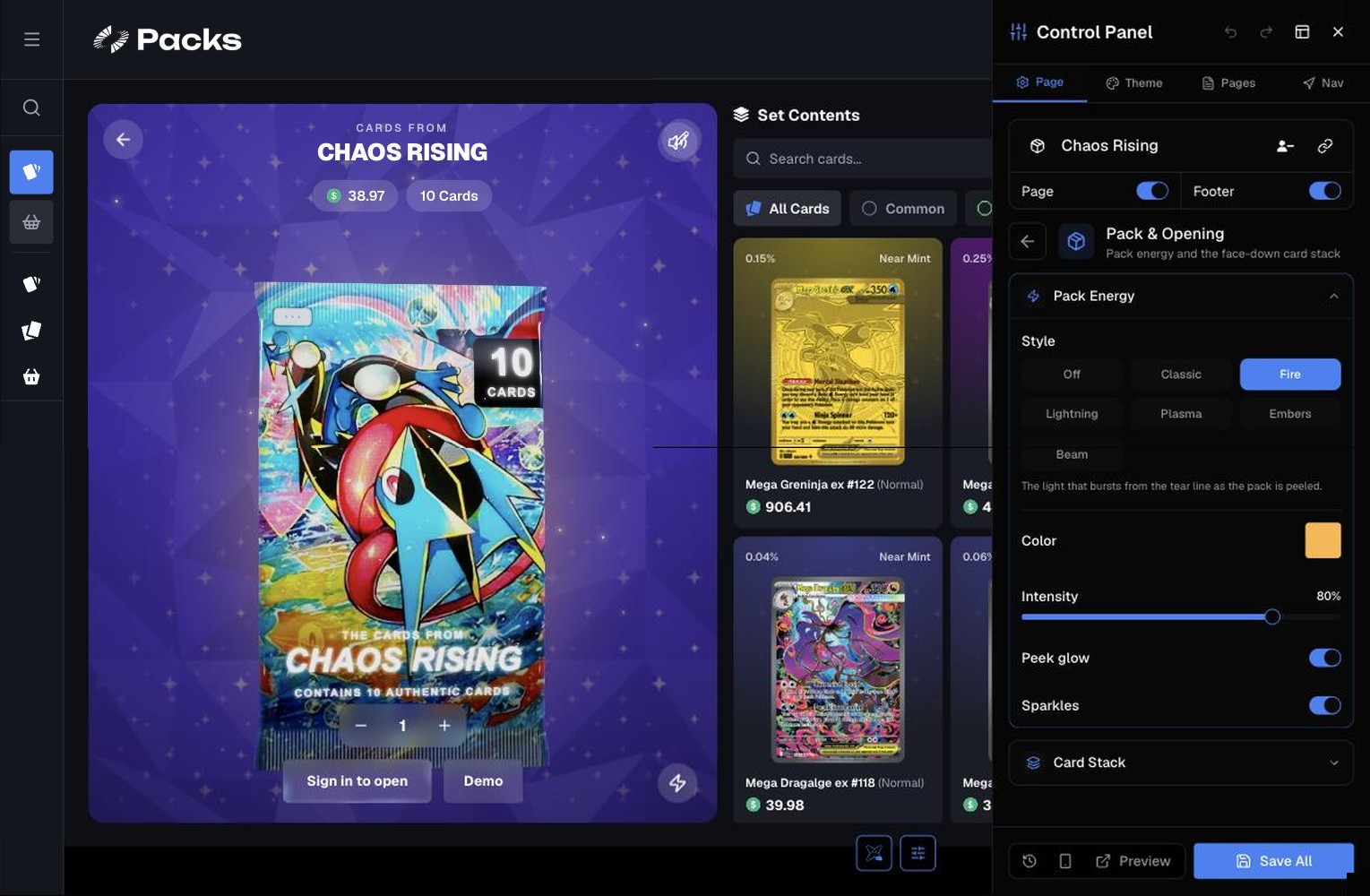
Pack Energy
The light that bursts from the tear line as the pack is peeled open.
| Setting | What it does |
|---|---|
| Style | Off, Classic, Fire, Lightning, Plasma, Embers or Beam |
| Color | Colour of the energy |
| Intensity | From 0% to 100% |
| Peek glow | Adds a glow as the wrapper starts to open |
| Sparkles | Adds sparkles to the burst |
Card Stack
| Setting | On | Off |
|---|---|---|
| Flick-up stack | Cards rise together as a stack after the rip | Cards enter one at a time |
Card Reveals
Card Charge
| Setting | What it does |
|---|---|
| Charge ranks | Face-down cards of the selected ranks glow in their rank colour before the flip |
Charging a rank tells the player a good card is coming before they see it. Select only your top ranks, so the glow stays meaningful.
Last Card
The show the last card gets while it waits face down.
| Setting | What it does |
|---|---|
| Play effect | Turns the last-card effect on or off |
| When it plays | Always, or Hits Only |
| Which effect | Pick one effect, play them at Random, In Order, or Always One |
| Effect | Vortex, Storm, Nova, Aurora, Shockwave, Prism or Constellation |
| Intensity | From 0% to 100% |
Ribbon
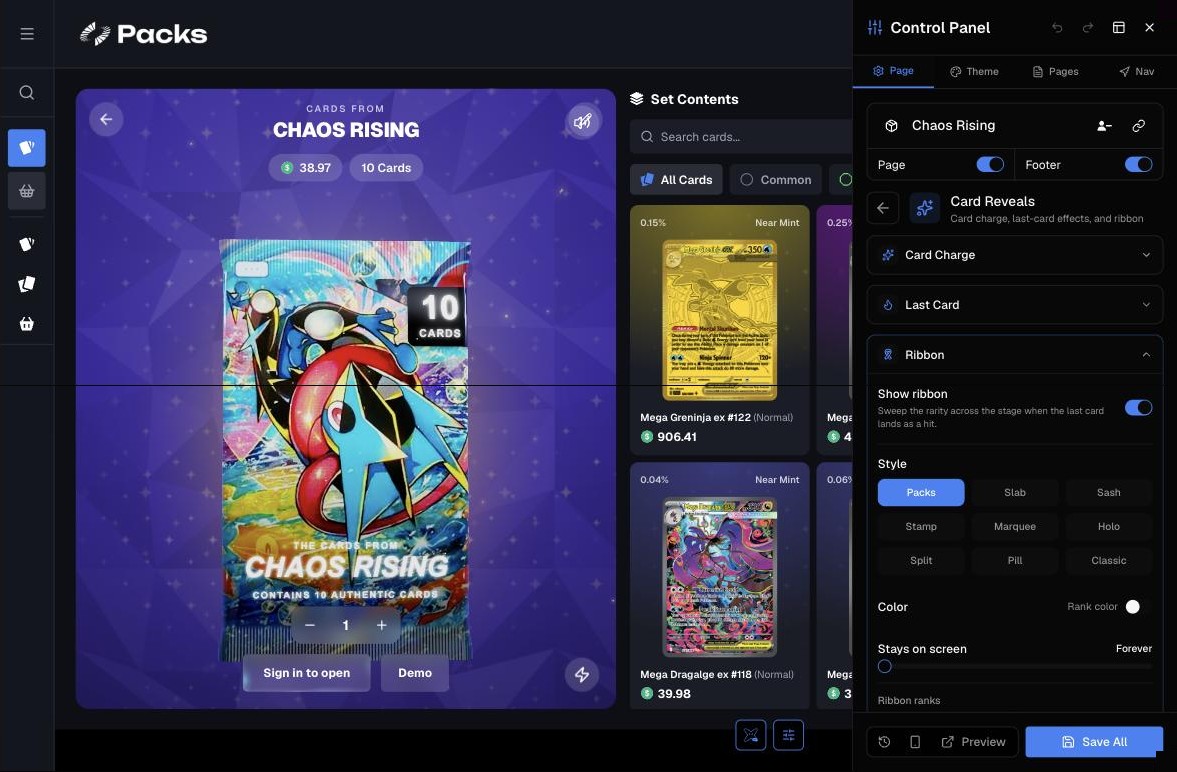
A banner that sweeps the rarity across the stage when the last card lands as a hit.
| Setting | What it does |
|---|---|
| Show ribbon | Turns the ribbon on or off |
| Style | Packs, Slab, Sash, Stamp, Marquee, Holo, Split, Pill or Classic |
| Color | The ribbon colour. Rank color uses the colour of the card's rank instead |
| Stays on screen | How long the ribbon stays, up to 6 seconds. At 0 it stays until the player moves on ("Forever") |
| Ribbon ranks | The final card earns a ribbon when it lands on any selected rank. Leave all off to celebrate every hit |
Choosing settings that suit the pack
- Match the energy to the price. A low-priced pack opened many times in a row reads better with a quiet style and Flick-up stack on. A premium pack can carry Lightning or Plasma at full intensity.
- Keep effects honest. Card Charge, Last Card set to Hits Only, and Ribbon ranks all react to what the pack actually returned. Set to Always, the last-card effect plays on every open, hit or not, and players stop reading it as a signal.
- Check it on a phone. Open the pack with Preview on phone / tablet before you save. Heavy effects cost more on older phones.
Like every Builder change, none of this is live until you Save All and publish.