
Builder
Pages
Every page on your storefront, how they are grouped, and how to add your own.
The Pages tab of the Control Panel lists every page on your storefront. Click a page to open it on the canvas; the page you are working on is marked Editing.
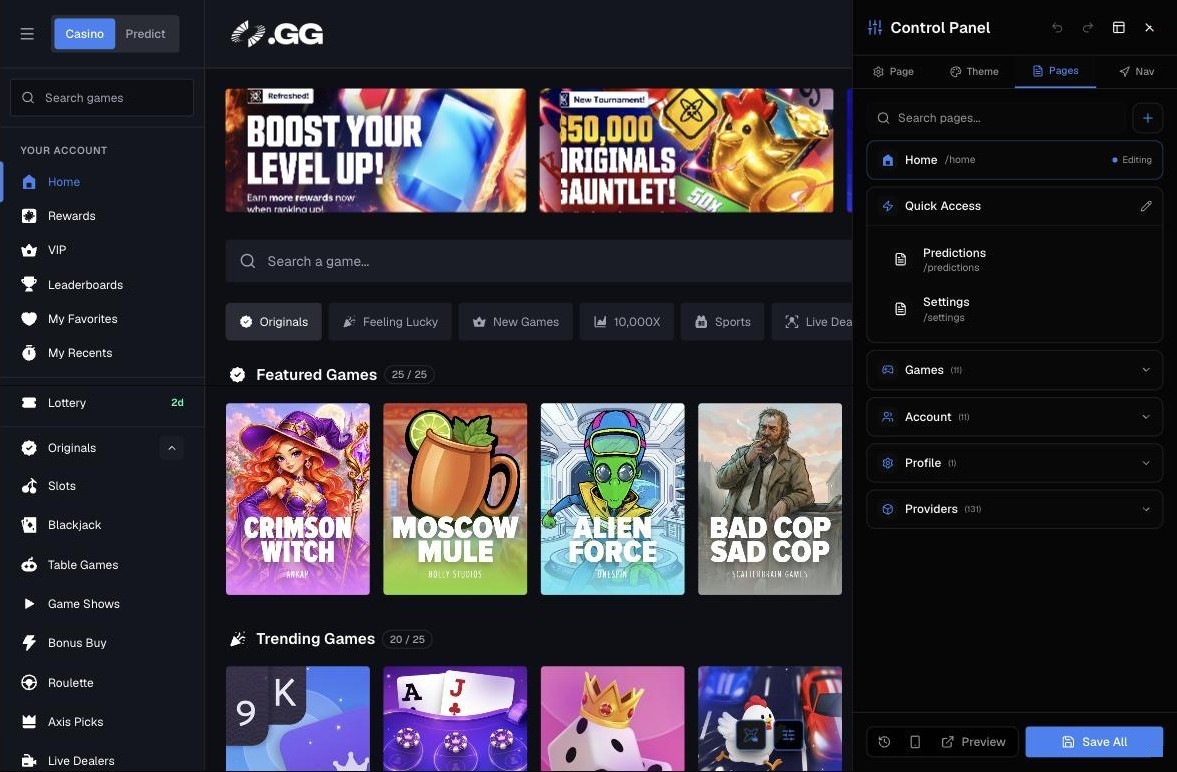
How the list is organised
| Group | What it holds |
|---|---|
| Home | Your homepage, at /home |
| Quick Access | Shortcuts to the pages you edit most |
| Games | Category pages for your game lobby |
| Account | Pages players reach from their account menu |
| Profile | The player's settings page |
| Providers | One page per game provider |
Use Search pages to jump straight to one.
Games pages
| Page | Address |
|---|---|
| Originals | /originals |
| Slots | /slots |
| Blackjack | /blackjack |
| Table Games | /table-games |
| Game Shows | /game-shows |
| Bonus Buy | /bonus-buy |
| Roulette | /roulette |
| Axis Picks | /axis-picks |
Pages you add yourself are tagged Custom, for example a /new-games or /live-dealers page.
Account pages
| Page | Address |
|---|---|
| Rewards | /rewards |
| VIP | /vip |
| Leaderboards | /leaderboards |
| My Favorites | /favorites |
| My Recents | /recents |
| Predictions | /predictions |
| Lottery | /lottery |
| Affiliates | /affiliates |
| Blog | /blog |
| Support | /support |
Provider pages
Every provider has its own page listing its games. You do not need to build these; they exist for each provider in the catalogue.
Quick Access
Quick Access pins pages to the top of the list. Click Edit quick access to choose which pages appear there.
Creating a page
- Click Create page.
- Give the page a name and an address.
- Build it on the canvas with the Page tab.
- Decide whether it appears in the sidebar with Show in sidebar.
- Save and publish.
A new page does not appear in the sidebar by itself. Add it to a sidebar section under Nav → Sidebar.
Plan limits
A Plus badge beside a page means editing that page needs the Plus plan. On the free tier this covers the game category pages, Lottery and Blog.